Everything you were wondering
From charging times and payment to connector types and partnerships — the questions we hear most, all on one page. Can't find yours? Write to us and we'll answer it and add it here.
Charging and Use
Start here if this is your first charge.
How long does a charge take?
It comes down to three things: the power your car can accept, how full the battery already is, and temperature. At our DC fast-charging points (120–240 kW) most electric cars go from 20% to 80% in about 22–30 minutes. On AC points (11–22 kW) the same top-up takes a few hours, which suits places where you park for longer.
The last 20% is deliberately slow — the car itself reduces power to protect the cells. On a road trip, charging to 80% and moving on is usually the fastest option.
How do I start a charge?
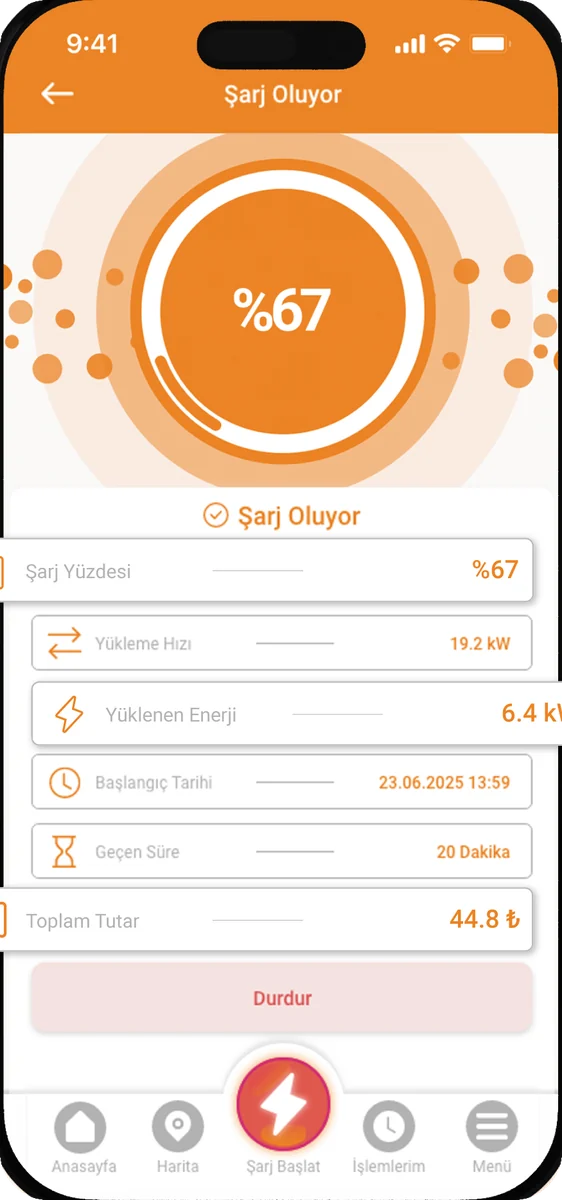
Download the app, create an account and add a payment card. At the station, plug the cable into your car, then scan the QR code on the unit or enter the station number in the app. Once the session starts you'll see live power, energy delivered and cost.
To finish, stop the session in the app and unplug.
How do I know a station is free?
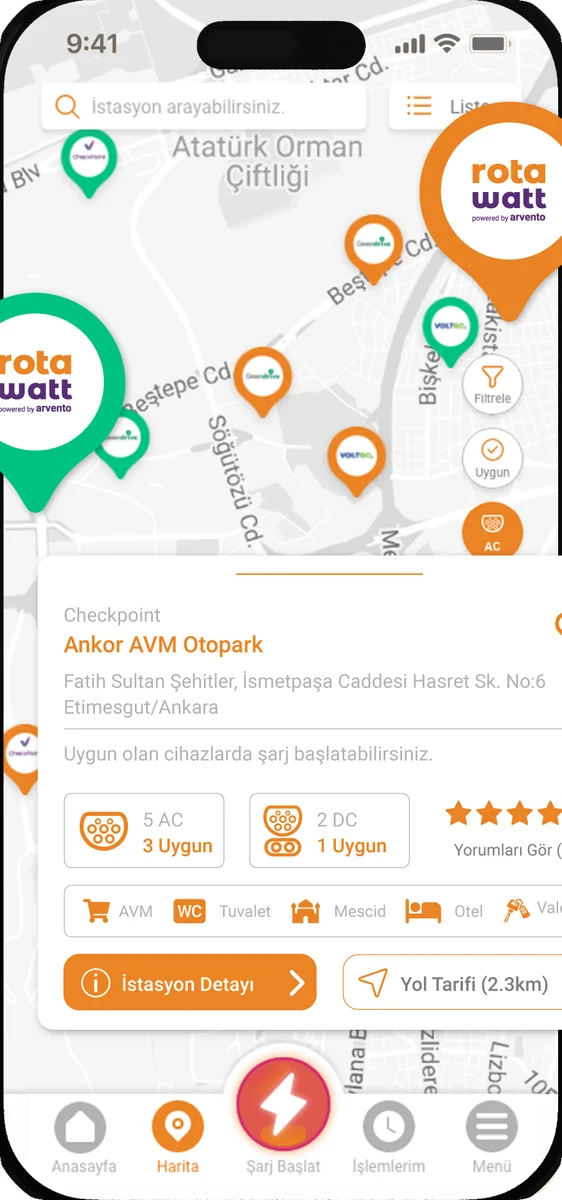
Our stations are monitored remotely, so availability appears live in the app and on our station map. Green markers are available; the rest are in use right now.
We recommend checking your destination station before you set off, and picking a backup point on longer trips.
Do I have to wait by the car while it charges?
No. Once the session has started you can leave the car and get on with your day — the app tracks progress and notifies you at 80%. That's also why we install our stations at shopping centres, car parks and fuel stations, where there's something to do.
Does charging stop by itself?
Yes. The session ends automatically when the battery reaches the target level or the car's management system decides it has had enough. You can also stop it from the app at any time. The unit cuts power before the cable is released, so unplugging is safe.
Is it safe to charge in rain or snow?
Yes. Charging units and connectors are built for outdoor conditions, and no power flows until the cable is locked in and the car and the unit have identified each other. Charging on wet ground works exactly as normal.
Still, try not to drop the connector on the ground, and clean it before plugging in if it has picked up dirt.
App and Payment
The questions we get most about accounts, payment and invoices.
How do I pay?
Payment is taken through the app from the bank or credit card saved to your account. You're charged only for the kWh you actually take — there's no connection fee. The amount appears in the app as soon as the session closes.
Where do I get my invoice?
Your invoice is emailed to the address on your account after the session. Every past charge and invoice stays available in the account section of the app. For company invoicing, just add your business details to your account.
Can I charge without registering?
An account is needed to start a session, track it and take payment. Registration takes a couple of minutes and you only do it once — after that, scanning the QR code is enough.
What if I stop charging halfway?
You pay only for the energy delivered up to that point. There's no penalty for stopping early. Just end the session in the app so the amount is calculated correctly.
Can I see my past charging sessions?
Yes. The app lists the date, station, duration, kWh delivered and cost of every session. You can see monthly totals and, for business accounts, export them for reporting.
Price and Tariff
Tariffs are published as required by EPDK regulation — and we publish ours openly.
What is your current tariff?
We publish our current DC and AC unit prices, power ranges and connector details on our tariff page, kept up to date. Prices are per kWh and include taxes.
Why do prices differ between operators?
Charging network operators set their own tariffs. The main drivers are the cost of electricity, distribution charges, the investment in hardware and installation, operation and maintenance, and site rent.
Checkpoint's approach is to carry Egesa's experience on the renewable generation side over to charging, and pass the cost advantage on to drivers.
How will I know if the tariff changes?
Charging network operators are required to publish their tariffs publicly. When prices change, our tariff page is updated and shows the date of the last change. The app also shows the applicable unit price before you start a session.
Is driving electric really cheaper than petrol?
Generally yes — the energy cost for the same distance is markedly lower. But the gap isn't fixed: your car's kWh/100 km consumption, the type of charging you use (home, AC, DC) and the fuel and electricity prices of the day all change the result.
To work it out for yourself: kWh your car uses per 100 km × unit price, versus litres burned per 100 km × price per litre.
Why would I need a public station if I charge at home?
Home charging is convenient for daily use but limited in power; filling an empty battery takes overnight. DC fast charging is what you want on a long trip or when you need energy quickly during the day — you're back on the road in about the time it takes to drink a coffee.
And not everyone has a garage or a socket; for many drivers the public network is the only option.
Vehicle and Technical
Connectors, power figures and battery health.
Which connector types do you support?
Our DC fast-charging points use CCS Combo 2 and our AC points use Type 2 (IEC 62196). The vast majority of modern electric cars sold in Türkiye use these two standards.
If you're unsure which your car has, check the owner's manual or the label inside the charging flap.
Will my car draw the full 240 kW?
The unit delivers as much power as the car accepts. If your car's maximum DC charging power is below 240 kW, it will charge at that figure — this is not a fault. The car also reduces power itself when the battery is very full, very empty or very cold.
When two cars charge from the same unit at once, power is shared between the outlets.
Does fast charging damage the battery?
Used occasionally, no. In modern cars the battery management system constantly monitors current, temperature and state of charge, and reduces power when needed.
That said, using only DC fast charging every day does mean slightly more wear over the long run than a mostly-AC routine. A mix is ideal. There's more in the battery health article in our blog.
Why does range drop in winter?
In the cold the internal resistance of lithium-ion cells rises, and cabin heating draws directly from the battery. Together they cut range noticeably.
Driving for a bit before charging, or using preconditioning if your car has it, both speeds up charging and puts less strain on the battery.
Can I charge using an adapter?
Adapters are not recommended for DC fast charging: the communication and safety locking between car and unit are designed around a direct connection. On the AC side, don't use anything your car manufacturer hasn't approved.
Stations and Partnership
If you're considering a station at your location.
I'd like a Checkpoint station at my business — how do we start?
Just fill in the form on our partnership page. Our team assesses your location for electrical infrastructure, vehicle traffic and parking layout; if it fits, we move on to a site survey and the contract.
Do I pay for the installation?
No. Installation, hardware, operation and maintenance are all on Checkpoint. You provide the space; we handle installing the unit, monitoring it remotely and supporting it technically.
What happens if a station breaks down?
Every unit is monitored remotely; when something goes wrong the system raises an alert immediately and our team responds. You can reach our 24/7 support line at 444 4 869 or through our contact page.
What kinds of locations work well?
For DC fast charging: intercity routes, fuel stations, shopping centres and busy car parks. For AC: hotels, offices, residences and anywhere cars are parked for longer. What matters most is traffic, dwell time and the electrical capacity already on site.
Where can I follow new stations?
Every point we bring online is added to our station map and to the app. Check the map now and then to follow the network as it grows.
Didn't find what you were looking for?
Let our support team answer it. Give us a call or fill in the form.